18 Conventional approaches to editing data with complex constraints
When data entry applications work on a schema with complex constraints, it is typically necessary to use dialog windows (i.e. "forms") which allow the user to edit temporary/transient variables before a transaction is submitted to the database when they press an "apply" button.
This is because constrained variables cannot be edited in-place.
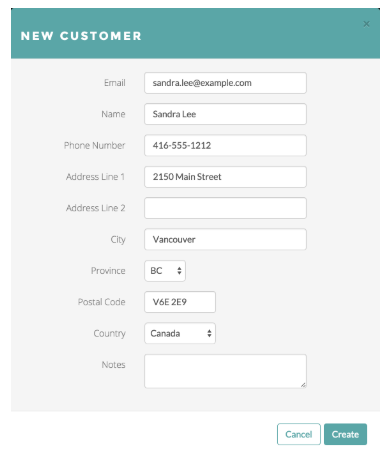
In-place viewing and out-of-place editing
The very fact that dialog windows are used to make updates, rather than allow for editing the data in-place, tends to mean application code needs to implement both a read-only viewer and an editor.
The viewer and editor are coded separately because they look and behave differently. Furthermore the viewer accesses the constrained variables in the database whereas the editor accesses unconstrained temporary variables (which typically are transient, but with added complexity can be persistent).
Regardless of whether an editor is in-place or not, it must validate the input and provide feedback to the user about errors, preferably in real time. For example data entry in forms requires application code to be written to validate the data entry.
Out-of-place editing of data tends to be inconvenient for users:
- there tend to be more mouse/keyboard actions involved when dealing with dialog windows (whether modal or modeless), such as the need to explicitly dismiss the dialog by clicking on a button
- dialogs steal valuable screen real estate - the user sometimes needs to move the dialog to see what's behind it.
- modal dialogs impose unwarranted constraints on what can be viewed and edited and when.
- modeless dialogs easily lead many active dialogs which confuse the user.
It's also inconvenient for application developers, because it creates extra complexity:
- In-place data entry is usually initiated by simply clicking on the item, whereas out-of-place data entry is typically initiated by menu items or buttons and this usually requires more code, and more UI design effort
- There's no saving for highlighting data entry errors to users, that needs to be done anyway in the dialogs
- Data types representing the "temporary variables" which are edited by the dialog must be defined.
- Values in the database must be copied into the temporary variables when the dialog is first created
- When the submit button is pressed the changes in the temporaries need to be applied back to the database. This can be more difficult than it sounds because it may not be efficient to apply the update operations as assignments. For example, sometimes flags are used to keep track of which fields were modified, or the new values of the fields are compared with their initial values to see what changed. By contrast, in-place editing leads naturally to simpler more efficient update operations that represent small efficient deltas to be applied.
- It's customary to provide some kind of response to the user that their update was applied successfully, or failed. This is yet more code to write and more actions for the user as they edit the data.
- The out-of-place editing of data represents a long lived read-modify-update operation, (by contrast they are short lived with in-place editing). It raises the possibility that another user might concurrently edit a separate set of temporaries and this can result in one user inadvertently losing the changes made in the meantime by another user. Solutions either involve locking or optimistic concurrency control. Either way it adds complexity and either blocks users or causes them to lose work, unless the application merges concurrent work (which adds yet more complexity).
- The application has to implement logic around whether to disable the submit button. A decent UI will disable ("gray") the apply button when either no edits have been performed or there are errors in the editing of the temporaries.
- Typically a client-side application handles constraint violation exceptions in a
"correct and re-submit" loop.
    Form form = Forms.getForm("NewCustomer");
    Form.Errors errors = null;
    do
        if (form.edit(errors))
            errors = form.submit();
    while (errors != null);
This concept isn't needed with in-place data entry
The conventional approach might work with something simple, like inserting customer records. But what happens when multiple users are doing something more complicated, such as editing a model of a car engine?